Security intelligence. Human control.
AI-powered surveillance for mines and businesses.
Turn camera footage into security intelligence. Oculion’s OmnisightAI tracks people and vehicles, flags activity against your site’s rules, and brings the evidence together for your team to act.
Your site. Your priorities. A pilot measured against both.
The operational gap
A camera can record an incident without anyone noticing it.
Most sites already have cameras in place. Yet across multiple screens and long shifts, even attentive operators managing gates, visitors, and site communications cannot catch every moment live. Footage is often reviewed only after a loss or disruption is discovered.
Multiple screens
Gate logs, radios, visitors, and camera feeds compete for the same attention. Important activity can slip between them.
Long shifts
Across long shifts and quiet stretches, a brief event at a perimeter gate or yard can go unnoticed until a loss or disruption is reported.
Attention where it matters
OmnisightAI tracks observed people and vehicles, checks configured zones and PPE requirements, and links flagged concerns to visual evidence. Guards and supervisors can assess the event and decide the response.
Site environments
Security built around your site.
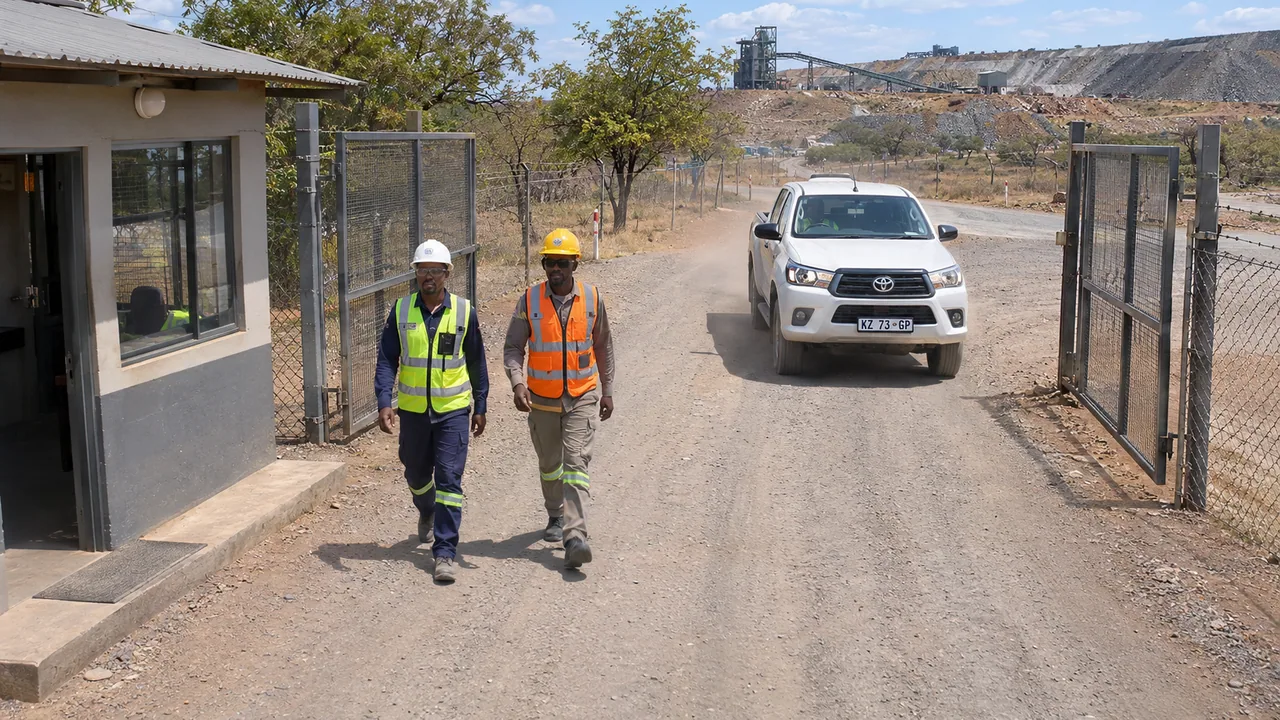
Illustrative detections — Mine perimeter gate, PPE & vehicle context (not live output)
1 / 5Mine and industrial pilots are our current priority.
See who enters, where they go, and which concerns need review.
From entrance checks to restricted areas, OmnisightAI tracks observed people and vehicles and flags concerns against configured site rules. Review PPE visibility and visible machine activity with supporting evidence in one workflow.
Monitoring priorities to discuss
- People and vehicle activity at entrances and defined zones
- PPE visibility checks at designated pedestrian checkpoints
- Restricted-area concerns and fixed-view machine-movement checks
OmnisightAI workflow
From observation to a clearer decision.
OmnisightAI turns observed activity into concerns your team can investigate. See the evidence, record a decision, and coordinate the response through your existing site procedures.
Observe relevant activity
OmnisightAI analyses the camera view, tracks people and vehicles, and checks the configured zones, PPE requirements, or visible machine movement.
Review the associated image and context
Open a flagged concern with its highlighted subject, source, timestamp, and available image or video evidence. Review what happened in context.
Decide what to do next
Human operators verify what is happening and take the right site action—whether logging a note, checking by radio, or escalating to a supervisor.
Illustrative pilot workflow
Explore three mine monitoring scenarios. Images and events are illustrative.
01 · Activity surfaced
People and an incoming vehicle are detected at the entrance. Person, helmet, vest, and number-plate regions are highlighted for review.
02 · Associated context
Review the subject-linked visual evidence to confirm PPE and the plate details. Plate text needs verification; an unconfirmed PPE item does not establish that it is absent.
03 · Operator decision
Visually confirm whether required PPE is worn or check with the gatehouse before yard entry.
Try recording an illustrative review action:
Paid pilot programme
A pilot with a clear purpose.
Put OmnisightAI to work against the concerns that matter at your site. We assess the camera view, agree the monitoring priorities, and measure evidence quality and operational usefulness with your team before discussing a wider rollout.
Site assessment
We inspect your camera positions, network connectivity, lighting conditions, blind spots, and current control-room workflow to confirm technical suitability.
Agree scenarios and success measures
Together we choose the concerns that matter most—such as PPE visibility, entry into restricted areas, or visible machine movement—and agree how to measure useful detections, missed events, and evidence quality.
Configure a controlled pilot
We configure the assessed camera source, monitoring zones, and agreed rules, then run the pilot with your team. Camera compatibility and the recording workflow are confirmed during assessment.
Review results and next steps
At the end of the agreed evaluation period, we review evidence quality, false-alert noise, and operational fit together before deciding any wider rollout.
Before your pilot
Clear expectations around camera suitability, operator review, and how a paid pilot is structured.
Pilot enquiry
Let’s look at your site.
Tell us where attention is stretched and what your team needs to see more clearly. Share your site details below, then review and send your enquiry by email or WhatsApp.
Direct enquiry channels